New Client Acquisition: Tactical Guide for 2026
Customer acquisition cost has increased by about 60% over the past five years, which means a missed call, slow callback, or weak intake process now costs more than it used to according to these CAC benchmarks. That changes the job of new client acquisition. It's no longer enough to “do some marketing” and hope volume covers inefficiency.
Most service businesses don't have a lead problem. They have a system problem. The plumber gets form fills but calls back late. The attorney gets consultations but accepts the wrong case mix. The clinic runs ads but sends everyone to the same generic contact page. Revenue stalls because the business is trying to scale demand with an intake and follow-up process built for referrals and manual admin.
The fix is operational, not just promotional. You need a client acquisition system that defines the right client, captures demand in a few strong channels, qualifies fast, follows up consistently, and routes work without overloading your staff.
Why Your Old Client Acquisition Methods Are Failing
Customer acquisition cost has climbed sharply over the past five years, so the margin for sloppy intake is gone. If a prospect calls your office, fills out a form, or requests an appointment and your process stalls, that lead often goes to the next provider who answers clearly and fast.
That failure usually has less to do with ad performance and more to do with how the business handles demand after it arrives.
A familiar pattern shows up across service firms. The plumbing company buys Local Services Ads but misses calls after 5 p.m. The law office offers free consultations but routes every matter, good or bad, into the same calendar. The clinic gets steady website traffic but sends paid clicks to a generic contact page with no service-specific booking flow. Lead volume looks acceptable. Conversion and margin do not.
Here's what outdated acquisition usually looks like in practice:
- One channel carries the whole pipeline: referrals, Google Ads, SEO, or a front-desk heavy walk-in model
- Every inquiry enters the same path: no separation by urgency, value, geography, or service line
- Response time depends on staff availability: inbox checks, voicemail reviews, and callback windows happen when someone has time
- Reporting stops at lead counts: owners track forms and calls, but not show rate, qualification rate, close rate, or speed to contact
Those methods held up when referrals covered mistakes and competition moved slower. They break once buyers compare three options in ten minutes from a phone.
The problem is operational drag
Operational drag shows up in small steps that kill conversion. A receptionist takes a message instead of booking. A form asks twelve questions on mobile. A new matter sits in a shared inbox because nobody owns first response. A missed call gets returned the next morning, after the prospect already hired someone else.
Buying more traffic into that setup does not create growth. It creates expensive waste.
Practical rule: If your team cannot answer, qualify, and book consistently within minutes, you do not have a lead generation problem. You have an intake capacity problem.
Strong operators treat acquisition as an operating system, not a campaign. They decide which channels deserve budget, then build the workflow behind those channels so the business can absorb demand without breaking service quality.
For a plumber, that often means call-first pages for emergency jobs, short mobile forms for quote requests, and after-hours routing to an answering service or AI assistant. For a lawyer, it means separate intake scripts for high-value case types, conflict checks early, and a consultation calendar tied to practice area. For a clinic, it means service-page booking links, insurance pre-screening before staff time gets used, and automated reminders that reduce no-shows.
Teams that want to connect with ideal customers usually start with messaging. That matters, but the bigger win comes from matching the message to an intake path that fits the job. Emergency repair leads need speed. High-ticket legal matters need qualification. Routine clinic bookings need low-friction scheduling.
A workable setup is straightforward:
| Weak setup | Scalable setup |
|---|---|
| All leads go to one inbox or front desk | Leads route by service type, urgency, and location |
| Staff writes replies from scratch | Staff uses scripts for calls, texts, and missed-call follow-up |
| Ads send traffic to one generic contact page | Each service has its own landing page and booking path |
| Owners judge marketing by volume | Owners track contact speed, qualification, booking, and close rate |
The script matters too. Here is a basic missed-call text a service business can use immediately: “Hi, this is Sarah from ClearFlow Plumbing. Sorry we missed your call. Are you dealing with an urgent issue, or would you like to book an estimate? Reply 1 for urgent help or 2 for scheduling.” That message does two jobs at once. It restarts the conversation and sorts the lead before a staff member gets involved.
Round-the-clock coverage is also part of acquisition now, especially for businesses that get leads outside office hours. Tools that support AI-assisted reception, triage, and service workflows can help maintain response speed without adding full-time headcount. This overview of AI in customer service operations covers the use cases clearly.
Old client acquisition methods fail because they were built for lower lead costs, slower buyers, and smaller volume. Growth now depends on a process that can capture demand, sort it, respond fast, and move qualified prospects into the right next step without creating chaos for your team.
Define Your Most Profitable Client Profile
Before you build funnels, decide which clients are worth acquiring. Not highest revenue on paper. Most profitable in practice.
Bain makes this point clearly in its analysis of small-business selling. Success depends on matching the go-to-market model to customer buying behavior and keeping service economics profitable as volume rises in this Bain piece on underserved small business markets. That matters because many service businesses grow into unprofitable work. They increase lead flow, then discover the jobs are hard to close, expensive to fulfill, or miserable to service.
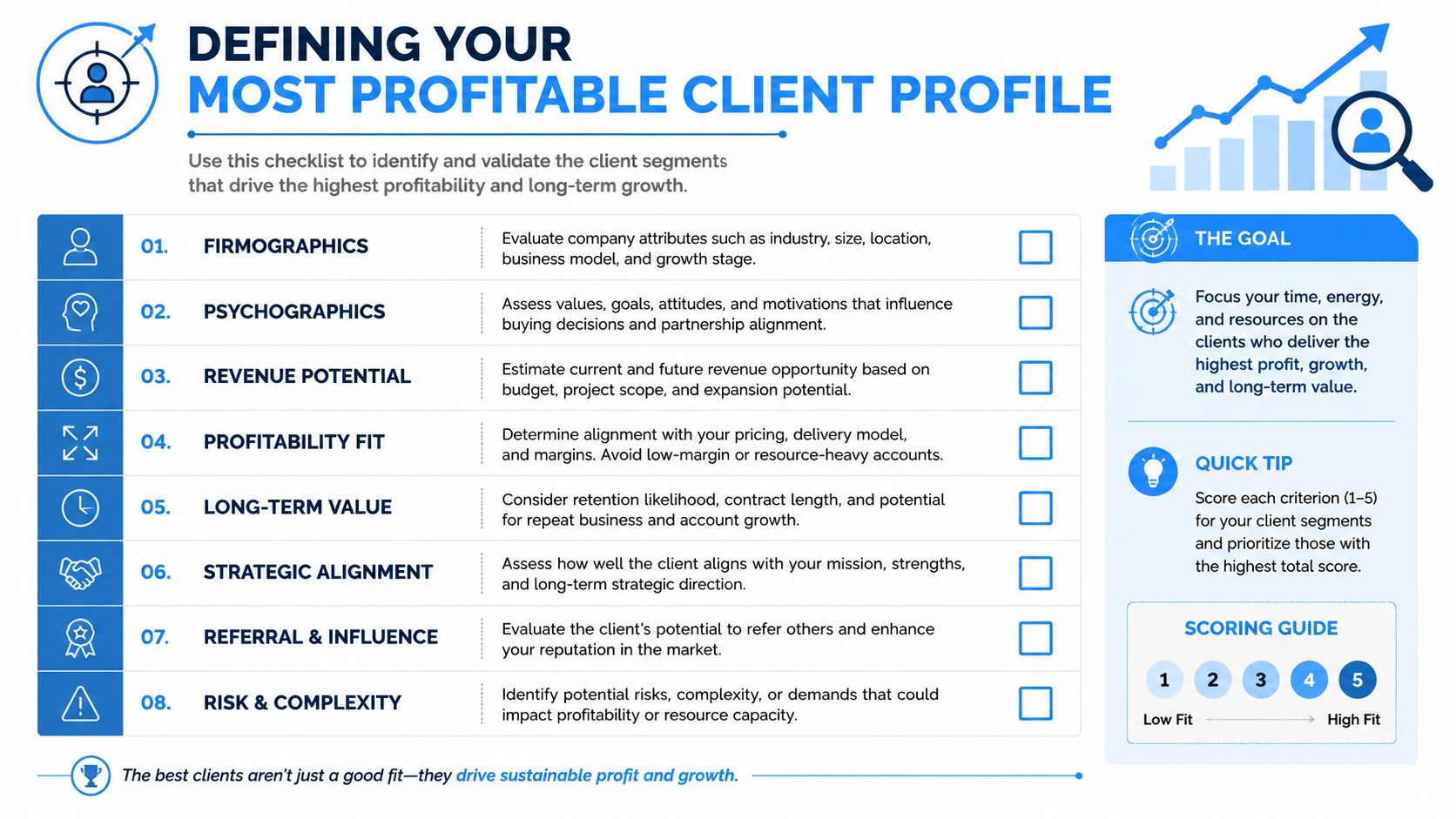
Score past clients by profit, not popularity
Pull your last closed clients and sort them into three buckets:
- Highly profitable and easy to serve
- Profitable but operationally messy
- Low-profit or high-drama work
Then score each type against practical criteria:
- Margin quality: Did the job hold margin after labor, travel, revisions, or write-offs?
- Sales effort: Did they buy quickly, or did they need repeated quoting and chasing?
- Delivery load: Did your team handle the work smoothly, or did it create service strain?
- Referral value: Do these clients send more business or strengthen your reputation?
- Repeat potential: Is there ongoing work, renewal potential, or cross-sell room?
If you need help turning this into messaging, positioning, and site copy, a useful primer on how to connect with ideal customers can help sharpen the profile beyond basic demographics.
Practical examples that change targeting
A family law firm may find uncontested divorce matters are less glamorous than litigation but cleaner to scope, faster to close, and easier to fulfill. That should change the intake form, the landing pages, and the follow-up script.
An HVAC business may discover multi-property landlords are better than one-off emergency homeowners because they produce repeat work, clearer authorization, and fewer payment issues. That should change outreach, offers, and account management.
A dental clinic may realize high-value cosmetic consults consume too much chairside time when the lead isn't financially qualified. That should change the pre-booking questions and financing discussion.
The right ideal client profile doesn't just tell you who to target. It tells you what kind of sales process your business can support without losing money.
Build a usable ICP sheet
Keep the profile to one page. Include:
- Best-fit segment: the type of client you want more of
- Typical trigger event: what causes them to start searching
- Preferred buying motion: call now, book online, request quote, or ask questions first
- Disqualifiers: jobs, cases, or inquiries that drain margin
- Routing rule: who on your team should handle this lead type
If your current intake process doesn't separate high-fit from low-fit inquiries, fix that before spending more on acquisition. A tighter qualification approach starts with the right profile and is easier to implement once your team understands how to qualify sales leads.
Construct Your Client Acquisition Funnels
The most reliable service businesses don't try to win everywhere. Consulting Success recommends concentrating visibility in 2–3 channels where decision-makers already spend time, then measuring leading indicators like new prospect conversations and opportunities generated in this client acquisition system guide. That advice is more useful than broad “be omnichannel” talk because it forces trade-offs.
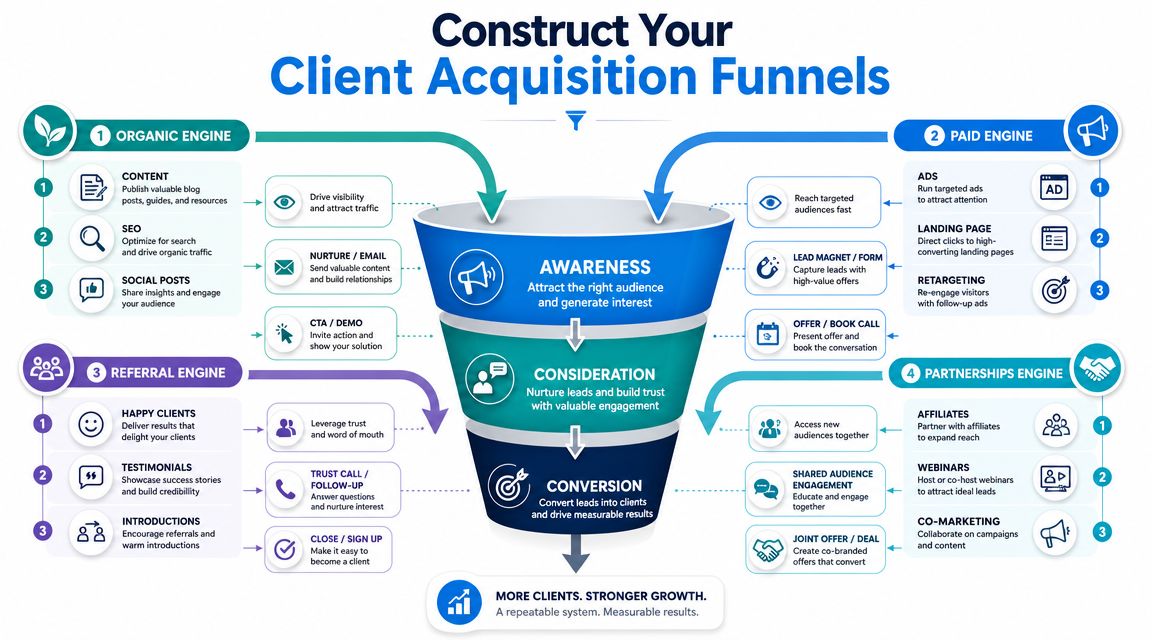
Pick your engines based on your ideal client, buying speed, and sales capacity. For most service businesses, there are four practical acquisition funnels.
Organic funnel for urgent local intent
A plumbing company should build around service pages with local intent, not a vague “services” page. That means separate pages for drain cleaning, water heater repair, leak detection, and emergency plumbing, each tied to service areas and a clear phone-first CTA.
What usually works:
- Local service pages: one page per service and geography
- Review capture: ask for reviews after completed jobs, not months later
- Call-first conversion path: sticky click-to-call on mobile
- FAQ content: answer urgent questions buyers search before they call
Many owners benefit from reviewing broader actionable digital marketing strategies and then narrowing them down to the few channels that fit their service model.
Paid funnel for narrow, high-value buyers
For a B2B legal or financial service, paid social can work when the audience is tightly defined and the offer is specific. Don't run broad awareness creative to everyone. Run one message to one segment with one next step.
A simple example:
- audience: operations leaders or founders
- offer: short advisory session or issue-specific checklist
- landing page: one pain point, one proof element, one booking action
This works best when the landing page matches the ad exactly. If the ad says “employee misclassification review,” the page should not open with “full-service legal solutions.”
A short video can help your team visualize how funnel pieces fit together in practice.
Referral funnel for trust-heavy categories
A dental clinic, law firm, or financial advisor shouldn't “hope for referrals.” Build a referral moment into the workflow.
Use a script like this after a good outcome:
“I'm glad we could help. We stay busy through introductions from clients who know someone dealing with a similar issue. If anyone comes to mind, send them my direct line and I'll take good care of them.”
Simple. No awkward speech. No gimmick.
Partnership funnel for adjacent audiences
A home inspector can partner with real estate agents. An estate attorney can partner with financial planners. A med spa can co-host an educational event with a skincare brand or wellness provider.
The best partnerships have:
- Audience overlap
- Clear handoff rules
- Educational content first
- A repeatable cadence
Monthly webinars, lunch-and-learns, or short co-branded guides outperform random networking because they create a reason to talk consistently.
Optimize Your Lead Capture and Qualification
Most lead capture problems aren't traffic problems. They're friction problems. A buyer lands on your page ready to act, then sees a generic “Contact Us” form with too many fields, no urgency path, and no clear next step.
A high-conversion page gives people options based on intent. Someone with an emergency plumbing issue wants to call. Someone comparing law firms may prefer a short intake form. Someone booking a clinic consult may want a live calendar.
Replace one path with three paths
A better lead capture setup usually includes:
- Call now for urgent buyers: phone button at the top and bottom of the page
- Book online for ready buyers: embedded scheduler with service-specific slots
- Ask a question for cautious buyers: short form or chat intake
That structure works because it matches behavior. Not every lead wants the same action.
Bad version:
- one long form
- broad “message” box
- no response expectation
- no service selection
Better version:
- service dropdown
- preferred contact method
- urgency or timeline field
- address or ZIP if location matters
- calendar option for consultations
Ask qualification questions that protect staff time
Qualification doesn't need to feel interrogative. It should answer whether the lead fits your service, budget, geography, and timing.
Use questions like these:
| Business type | Useful qualification question |
|---|---|
| Plumbing | “Is this urgent, or are you planning work for a later date?” |
| Law firm | “What type of legal matter are you contacting us about?” |
| Clinic | “Are you looking to book an appointment, or do you have questions before scheduling?” |
| Insurance | “Are you comparing policies, renewing, or replacing current coverage?” |
Screen for fit early: if a lead is outside service area, outside case type, or not ready for your process, route them differently before a staff member spends time on manual follow-up.
For small teams, this gets easier when forms, chat, call logs, and appointment data all feed into one place. A practical starting point is to use a centralized system for inquiry routing and status tracking, such as the options covered in this guide to lead management software for small business.
The handoff needs ownership
Every lead should trigger an explicit next action:
- assigned to a person
- tagged by service line
- marked urgent or standard
- moved to booked, nurture, or disqualified
If nobody owns the next move, the lead is already decaying. New client acquisition improves when the capture page and the intake workflow are designed together, not by different people in different tools.
Master the Follow-Up to Convert More Leads
A lead without follow-up is just a receipt for marketing spend. Most service businesses lose more opportunities in the first few contact attempts than they realize because nobody owns a consistent cadence.
HubSpot's 2026 marketing statistics report says 42% of marketers used LinkedIn in 2025, which reinforces how mainstream digital acquisition has become, and it also notes that many teams aim for an LTV:CAC ratio above 3:1 for sustainable growth in HubSpot's marketing statistics roundup. If your front-end channels are becoming more measurable and competitive, your follow-up can't stay casual.
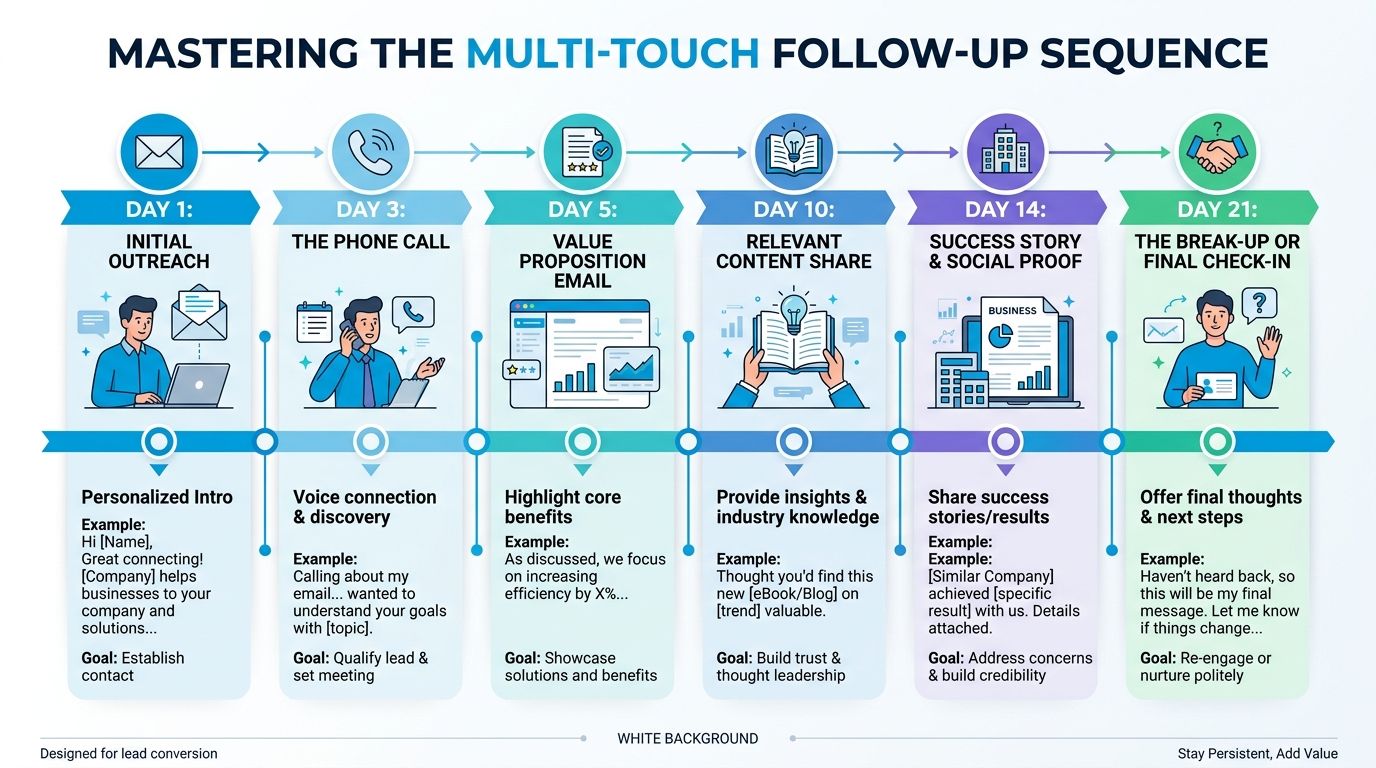
A practical follow-up cadence
Use a simple multi-touch sequence that mixes phone, text, and email.
Immediate call
Call as soon as the lead arrives. If they answer, confirm the issue, ask one or two qualification questions, and book the next step.Text after missed call
Send a short message if they don't answer:Hi [Name], this is [Business]. We saw your request about [service]. You can reply here or call us back, and we can help you get the next step scheduled.
Email later the same day
Keep it brief. Restate the issue, link to scheduling if relevant, and tell them what happens next.Second call on the next business day
Don't repeat the first voicemail word for word. Reference the original request and offer a simple path forward.Value-based follow-up
Send something useful. For a clinic, prep information. For a law firm, an intake checklist. For a home service company, a short explanation of what to expect during the visit.Breakup message
Close the loop politely:We haven't been able to reach you, so we'll pause outreach for now. If you'd still like help with [issue], reply to this message and we'll pick it back up.
Use scripts that sound human
Your first call shouldn't sound like a script, but your team still needs a structure.
Try this opener:
“Hi [Name], I saw you requested help with [service] on our website. What's the main issue you're dealing with?”
That works because it starts with their problem, not your company pitch.
For a law office:
“Thanks for reaching out. Before we schedule, I want to make sure you're speaking with the right person. Can you tell me briefly what kind of matter this is?”
For a clinic:
“I can help with that. Are you looking to book the first available appointment, or would you like to ask a few questions before choosing a time?”
Build the sequence once, then automate it
Manual follow-up always degrades under pressure. Front desk staff get interrupted. salespeople cherry-pick leads. messages go unsent. Put the sequence into your CRM or email platform so the system creates the task, sends the first text, and reminds the owner of the next step. If you're building that process now, this guide on how to automate follow-up emails is a good operational reference.
Scale Your System with Automation and AI
Manual acquisition usually breaks at the handoffs. A lead comes in, one field is missing, the callback goes out late, scheduling happens in a different tool, and no one can say which channel produced the booked job. That is the point where growth gets expensive.
Automation matters because it removes delay and inconsistency across the whole path from inquiry to booked work. Braze notes that AI and predictive analytics are increasingly used to improve lead quality, identify prospects more likely to convert, and support dynamic messaging in this customer acquisition strategy article. For a service business, that matters more than adding raw lead volume. More low-intent leads create more admin work. Better routing and qualification produce a pipeline your team can handle.
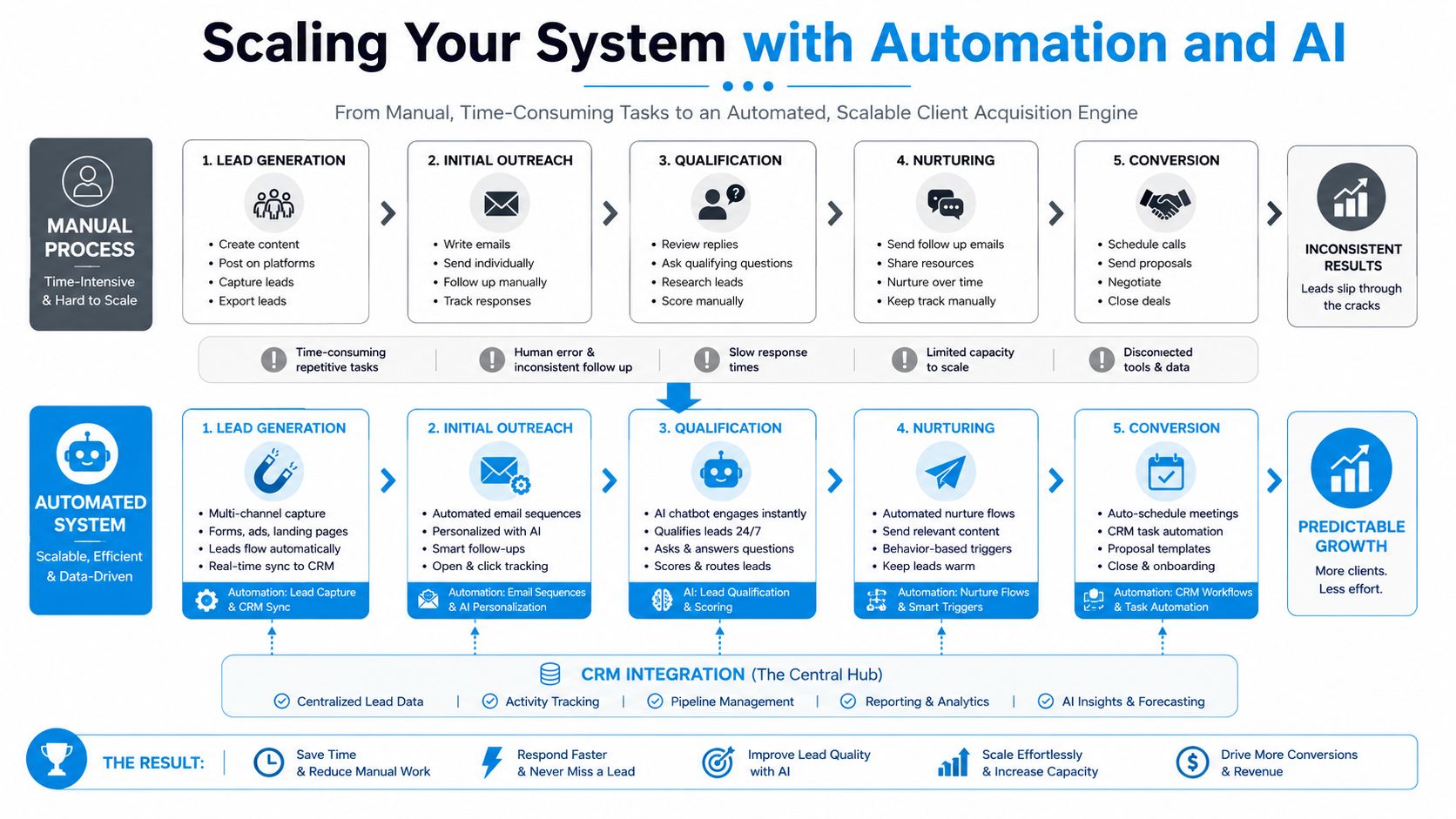
The practical stack
Keep the setup simple and connected:
- Lead source layer: website forms, call tracking, live chat, paid landing pages
- CRM layer: one record per inquiry with source, service type, urgency, and owner
- Scheduling layer: appointment calendar or dispatch board tied to real availability
- Messaging layer: SMS and email triggered by status changes
- Reporting layer: source-to-booking-to-close visibility, plus no-shows and lost reasons
The key decision is where the handoff happens. If the website form writes to one inbox, phone calls land in another system, and scheduling lives in a third tool with no sync, staff will keep re-entering data. Errors follow. A plumber ends up sending a tech to a low-value estimate while a high-margin emergency call waits. A law firm books consults without conflict-check details. A clinic fills provider time with poorly matched appointments.
Where AI helps
Use AI where speed matters and the questions repeat. That usually means after-hours calls, first-pass qualification, appointment booking, and common intake questions.
Recepta.ai is one example of that category. It handles inbound calls, lead capture, appointment scheduling, and follow-ups while syncing with business systems. For a small office, that can prevent the common scaling problem where lead volume rises faster than the front desk can respond.
Keep human staff on the parts that require judgment: pricing exceptions, legal nuance, insurance questions, and any conversation where trust determines the sale.
Build workflows around triggers
Every trigger should create a next step. If it does not, the record just sits in the CRM and your team calls that a pipeline.
Use triggers like these:
- New form submission: create contact, tag source, assign owner, send confirmation text, start callback timer
- Missed call: log the lead, send "sorry we missed you" text, create same-day callback task
- Qualified lead: push to scheduler, send booking link, alert the right rep or location
- Booked consult: send confirmation, intake form, and reminders based on lead time
- No-show: trigger a rebooking sequence within minutes, not days
- Estimate sent but not accepted: start a timed follow-up with objection-based messaging
- Disqualified lead: tag the reason so marketing can stop paying for the wrong traffic
The capacity for scale either holds or slips. If a plumbing company gets 40 leads on Monday, the system should route emergency calls to dispatch, send financing information only for eligible jobs, and queue non-urgent estimates for the sales coordinator. If a law office gets a surge of intake requests after a campaign, the workflow should collect matter type, location, and urgency before a staff member spends ten minutes on the phone. If a clinic ramps paid search, new patient requests should be matched to provider type and insurance fit before they ever hit the calendar.
A workable setup for small service teams
A practical build often looks like this:
- Forms and landing pages: Typeform, Jotform, or native forms inside your CRM
- CRM: HubSpot, GoHighLevel, Pipedrive, or the practice management system you already use
- Call tracking: CallRail or your phone platform's tracking features
- Scheduling: Calendly, a dispatch tool, or your EHR or case management scheduler
- Automation: built-in workflow tools first, Zapier only where needed
- Messaging: Twilio, CRM SMS, or your patient/client communication tool
Start with one service line, one channel, and one follow-up path. Get the routing right. Then add complexity. That order matters because a bad automated workflow creates faster mistakes, not better operations.
Track Key Metrics for Sustainable Growth
Most owners either over-measure or under-measure. They track a dashboard full of activity metrics, or they look only at revenue after the month is over. Neither helps you improve acquisition in time.
Mailchimp gives the simplest starting point: acquisition rate = (new customers / total leads) × 100 and recommends treating it as a time-bounded metric so you can compare the same funnel over time in this acquisition rate guide. That discipline matters because optimization only works when the denominator stays clear.
The metrics that actually matter
Track these four:
- Acquisition rate: how many leads become new clients
- Channel-level lead quality: which sources produce qualified conversations
- Sales cycle friction: where leads stall between inquiry, booking, and close
- LTV:CAC relationship: whether the economics support continued spending
A business owner doesn't need a fancy BI stack to start. A CRM, clean source tags, and a weekly review are enough.
Use the numbers to make decisions
If one channel sends plenty of inquiries but few qualified appointments, don't just cut the channel. Check the message, offer, and landing page match first.
If qualified leads book but don't close, inspect the consultation script and pricing conversation.
If booked appointments no-show, fix reminders and confirmation steps before touching the ad account.
Measure one funnel for one period, change one variable, and watch the result. That's how acquisition gets better without turning into guesswork.
A simple review rhythm
Every week, review:
- source of each lead
- whether the lead was qualified
- whether a conversation happened
- whether an appointment was booked
- whether the client closed
Every month, decide:
- which channel to increase
- which service line to deprioritize
- which script, page, or form to test next
The businesses that win at new client acquisition don't rely on hustle. They run a repeatable system, then tighten the weak point.
If you want a faster way to capture, qualify, and schedule inbound leads without building the entire front-desk workflow from scratch, Recepta.ai is worth evaluating. It handles calls, appointment booking, follow-ups, and intake routing in one workflow, which is useful for service businesses that need better response coverage without adding more manual admin.