Pipeline Sales Definition: Stages, KPIs, and CRM Mapping
You're probably juggling leads that live in three places at once. A voicemail has a hot inquiry, your inbox has a quote request, and a sticky note on someone's monitor says “call back Friday,” but nobody can say which deals are real, which ones are stalled, or what's likely to close this month.
That's the problem a sales pipeline solves. It gives your team one shared view of where every active opportunity sits, so you can track progress, spot bottlenecks, and forecast revenue with less guesswork, which is exactly why pipeline management sits at the center of modern sales operations ZoomInfo's pipeline overview. For a new manager, that shift from scattered activity to structured stages is usually the first real step toward a calmer, more predictable revenue process.
Why Your Sales Process Feels Chaotic Without a Pipeline
A lot of owners don't realize their process is broken until they try to explain it to someone else. One rep is working a plumbing estimate by text, another is following up on a kitchen remodel by email, and the office manager is holding a half-updated notebook that nobody else can read. The result isn't just disorganization, it's uncertainty about what deserves attention today and what died last week.
A pipeline fixes that by turning every opportunity into a visible, shared record of progress. IBM describes a sales pipeline as a set of clear steps that move a lead from first contact through offer and close, which is why it's useful for planning next actions, not just tracking status IBM on sales pipelines. In practice, that means a home services company can see whether a roof repair lead is still in first contact, already quoted, or waiting on approval, while a dental clinic can tell whether a new inquiry has made it to consultation.
Why structure changes the day-to-day
When the pipeline is defined well, a manager can coach from facts instead of memory. That matters because stage-based systems became important precisely because CRM tools made it possible to standardize deal tracking and forecast from the same record of truth Salesforce pipeline history and structure.
Practical rule: If two people can look at the same deal and disagree about what stage it belongs in, the process is too fuzzy to manage.
The benefit isn't abstract. A pipeline gives you one place to see next steps, deal age, and stage movement, which makes it much easier to tell whether the team is selling or just staying busy. The structure also helps you spot where revenue leaks, especially when a stage is full of names but nothing is moving.
That's why pipeline thinking is such a high-impact change for small teams. It replaces scattered follow-up with a disciplined rhythm, and once that rhythm exists, it becomes easier to define the pipeline, map the stages, choose the right KPIs, and keep the CRM clean enough to trust.
A useful internal planning guide on standardizing processes is process standardization, because pipeline quality usually starts with operating discipline, not software.
The Pipeline Sales Definition and How It Differs From a Funnel
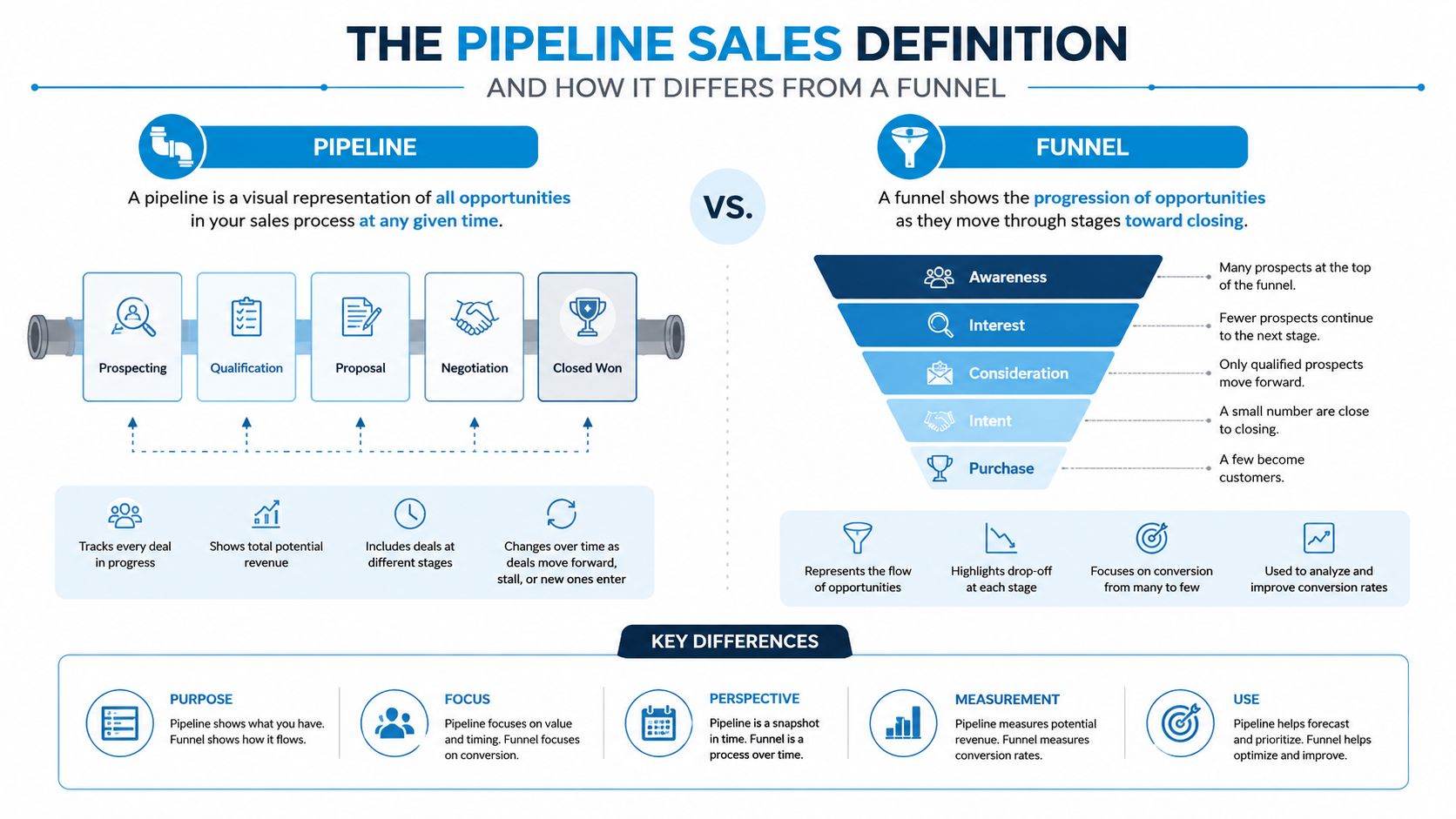
A sales pipeline is the seller's view of active deals, organized by stage from first contact to closed-won or closed-lost. That is the cleanest pipeline sales definition to keep in mind, because it shows where real opportunities sit right now, not where every possible buyer exists in the market. It is the working list a manager checks to see what needs attention today, what is stalled, and what may close next.
A forecast is different. It is the expected revenue snapshot, often weighted by stage probability, so it answers a narrower question, “What do we believe will close?” A funnel is different again. It shows conversion flow across the wider market or lead set, so it answers, “How many people moved from one broad step to the next?”
The three terms get mixed up because they all use the same deal data, but they answer different management questions. A pipeline is about live opportunity management. A forecast is about expected revenue. A funnel is about volume and conversion across the larger pool of prospects.
Three ways to keep the difference straight
A pipeline works like the active lanes in a CRM. You can see which opportunities are moving, which ones are idle, and which ones need a follow-up before the record goes cold.
- Pipeline: the active deal path, with known opportunities moving through defined stages.
- Forecast: the revenue view, or how much closing value you expect at a point in time.
- Funnel: the wider shape of lead flow, showing how many prospects enter and how many make it through.
The same distinction shows up in real teams. A home services manager may have one pipeline for booked estimates, another forecast for jobs likely to close this month, and a funnel showing how many website inquiries turned into callbacks. In healthcare, a practice can track referrals in the pipeline, predict scheduled appointments in the forecast, and measure how many inquiries became consults in the funnel. Legal teams do the same thing when they separate new matters, likely retainers, and the broader set of people who asked for help but never converted.
That separation matters because buyers often ask the wrong question first. They ask for a definition, when what they really need is to know when a lead becomes pipeline, when it becomes forecastable, and when it should stay in the broader funnel. Once those boundaries are clear, CRM reports stop looking contradictory and start reflecting how the business sells.
The Six Stages Every Sales Pipeline Shares
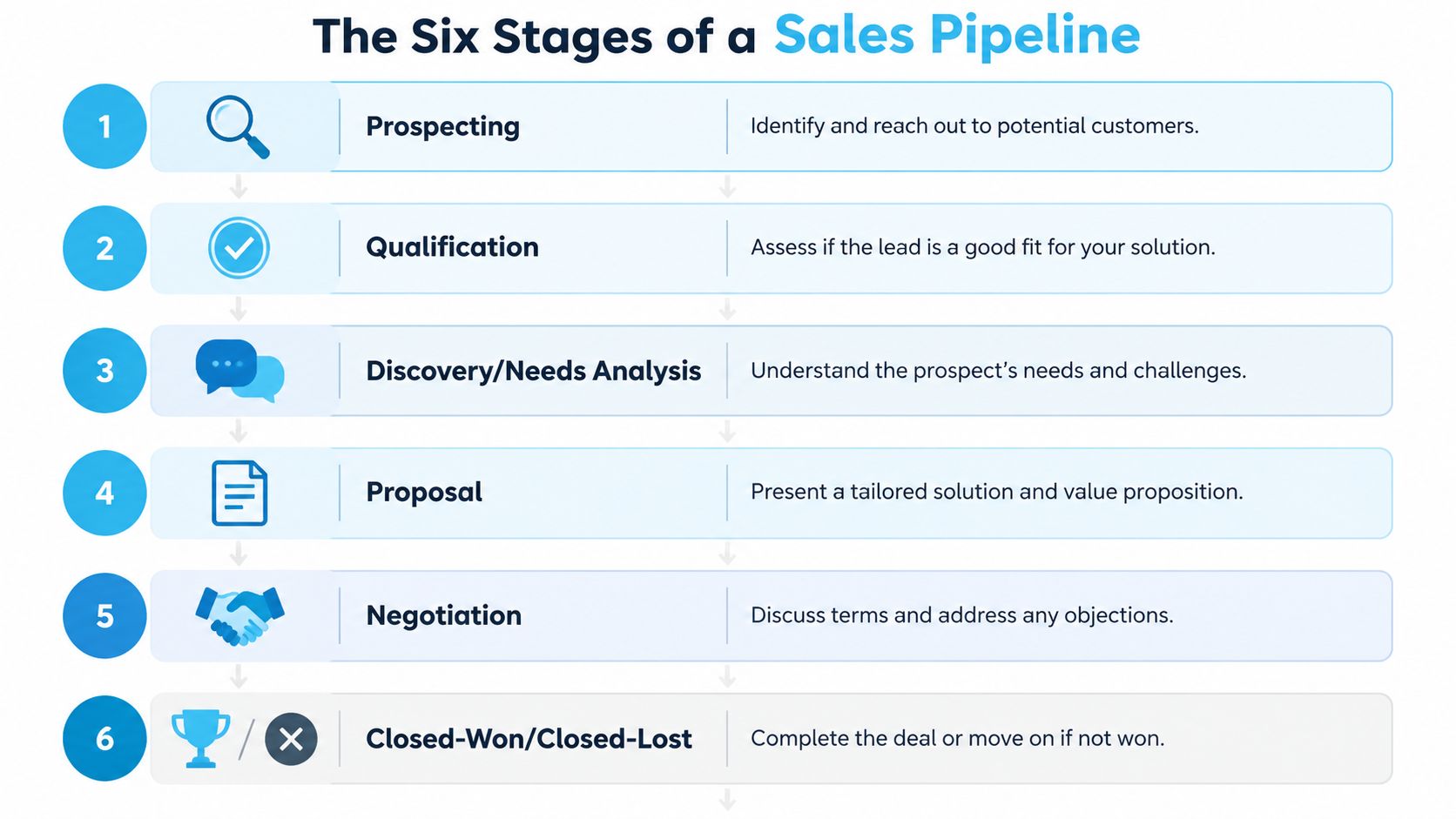
Most pipelines follow the same core sequence, even when the labels change. The stage names below are the standard pattern, but the exit criteria matter more than the wording, because a stage only helps if everyone agrees on what has to happen before a deal moves forward.
Stage by stage with real exit signals
Prospecting starts the moment a new opportunity earns a place in active tracking. The seller's job is to capture enough context to know who the buyer is and why the inquiry matters. A deal should leave this stage only when there's enough information to justify real follow-up, not just curiosity.
Qualification is where weak fits should fall out quickly. The buyer signal here is simple, there's a realistic chance to buy, and the seller should confirm budget, authority, need, and timing before moving on.
Discovery or needs analysis is where the rep listens, documents the problem, and maps the buying motive. A deal gets out of this stage when the team understands what the customer wants, what's blocking the purchase, and what next step the buyer agrees to take.
Proposal begins once the solution is specific enough to price or present. The seller should be sending something tangible, while the buyer signal is that the customer is reviewing a real offer instead of just asking general questions.
Negotiation is the back-and-forth stage where terms, timing, or scope get adjusted. A deal should exit when both sides have aligned on the commercial details and the next step is decision, not more open-ended discussion.
Closed-won or closed-lost ends the active cycle. The red flag for stuck deals is simple, they stay in negotiation long after the conversation stopped changing.
A cleaning company may label the path Lead, Quoted, Site Visit, Scheduled, Completed. A dental clinic may use Inquiry, Consultation, Treatment Plan, Financial Agreement, Active Patient. A law firm might prefer Intake, Conflict Check, Consultation, Engagement Letter, Matter Opened. The structure is still the same, even if the local language changes.
The practical lesson is to define each stage by a customer action, a seller action, and a clear exit rule. That's what keeps the pipeline from becoming just a prettier list of names.
The Five KPIs That Actually Move Pipeline Performance
A good pipeline doesn't just show deals, it tells you which numbers you can improve. The five KPIs below are the ones a manager can work on without needing a new strategy team or a full system rebuild.
| KPI | Formula | Healthy Benchmark | Action When Off-Target |
|---|---|---|---|
| Pipeline velocity | (opportunities × average deal size × win rate) ÷ average sales cycle length | Higher is better, and shorter cycles, stronger win rates, and larger deal values all raise it Zendesk's pipeline management guide | Tighten qualification, shorten stalled stages, or improve follow-up discipline |
| Win rate by stage | closed-won deals from a stage ÷ deals that entered the stage | Industry guidance notes 20–30% per stage is a common range ZoomInfo | Review messaging, objections, and exit criteria in the weak stage |
| Average deal size | total deal value ÷ number of deals | Bigger isn't always better, but this number should stay consistent with your market | Recheck packaging, pricing, or upsell opportunities |
| Sales cycle length | average days from first contact to close | Commonly 30–90 days depending on contract value ZoomInfo | Remove friction, reduce handoffs, and tighten decision steps |
| Pipeline coverage ratio | total pipeline ÷ revenue target | A common benchmark is 3–4x quota ZoomInfo | Add top-of-funnel volume or improve conversion quality |
For a quick spreadsheet check, take your qualified opportunities, multiply by your average deal size, then multiply by your stage win rate and divide by your average cycle length. That gives you a practical view of velocity, even before you build more advanced reporting. Salesforce's pipeline math frames the same idea by showing how opportunities, deal value, win rate, and cycle length combine into revenue per day Salesforce.
How the numbers work together
The trap is to optimize only one metric. Faster cycles help, but if coverage is thin, you still miss target. Higher win rates help, but if deal size falls or the team starves the top of the pipeline, the improvement disappears.
A related internal monitoring framework is performance monitoring systems, because pipeline KPIs work best when they're reviewed regularly rather than saved for quarter-end panic.
How Home Services, Healthcare, and Legal Teams Use the Same Pipeline Differently
A pipeline is shared structure, but the stages feel different in each industry. The math stays familiar, yet the buying triggers, documentation needs, and stall points shift by category.
Home services move fast
A pest control lead often starts with urgency. The customer wants relief, the office books an estimate, the technician confirms the issue on site, and the quote either turns into a scheduled job or disappears. In that flow, the manager cares a lot about speed and stage discipline, because the buyer's pain is immediate and the deal can go cold if the team waits too long.
A cleaning company usually tracks practical milestones instead of abstract sales language. Lead, quote, site visit, scheduled service, completed job, those are the key handoff points. The best teams capture the address, service type, urgency, and preferred time right away so no one has to hunt through old messages later.
Operational note: In home services, missed calls and slow callbacks often look like “lost interest” in the CRM, when the real issue is simply that nobody picked up fast enough.
Healthcare and legal need heavier qualification
Healthcare workflows often require more trust-building and more administrative confirmation before a deal feels real. A dental clinic, for example, may move from inquiry to consultation, then to treatment plan, then to financial agreement before the patient is fully committed. The seller's job is less about pressure and more about reducing friction, clarifying next steps, and documenting what the practice needs before booking.
Legal is usually slower still. An intake form, a conflict check, a consultation, and an engagement letter create a longer path before the matter opens. That's where pipeline hygiene matters most, because deals can stall between stages if the office never records who approved what or whether the prospect is still responsive.
For firms in these categories, a good reference point is home service business software, because the operational logic behind quick-response scheduling and structured intake transfers well to any local service workflow.
Mapping Your Pipeline Inside a CRM in One Afternoon
A CRM pipeline works best when the structure matches the way your team sells. A manager who opens the system and sees a pile of unlabeled opportunities has no clear way to coach, forecast, or spot stalled work. Start by defining the information each deal must carry, then decide how stages should move, then set the alerts and reports that keep the record honest.
Build the data first
Every deal record needs estimated close date, deal value, source, and next action. Without those fields, the pipeline becomes a contact list with a sales label on it. Add the details that change movement in your own market, such as service area for home services, provider type for healthcare, or matter category for legal.
A hospital intake team, a plumbing dispatcher, and a law office do not use the same context, but they all need the same discipline inside the CRM. Home services may need the address and service type before scheduling. Healthcare may need referral status or insurance details before a consultation is real. Legal teams often need intake notes and conflict-check status before a matter can move. If the record does not show what happened, what is needed next, and who owns the next step, the stage label is doing work the data should be doing.
Define exit criteria for every stage. A deal should move only after a customer action has happened, the required information is captured, and the next step is agreed. That rule keeps the pipeline from turning into a row of guesses.
Add automation only after the stages are clear
Once the stage rules are set, add stage-change alerts, overdue follow-up reminders, and stale-deal notifications. Those automations help reps avoid dropping a lead after the first conversation and help managers catch drift before the month starts to slip. Clean system connections matter here, because fewer manual updates means fewer gaps between the CRM and the tools your team uses. A CRM integration guide can help you see how that connection should support the workflow.
A practical CRM checklist looks like this:
- Fields first: lock in the data you need for every active opportunity.
- Stages second: define the milestones that justify movement.
- Automations third: alert reps when work needs attention.
- Dashboards last: track pipeline value by stage and coverage versus quota.
Keep the dashboard simple
Two widgets are enough for many new managers. One should show pipeline value by stage, so you can see where work is stacking up. The other should show coverage ratio versus quota, so you know whether the team has enough in motion to support the forecast.
A CRM should reflect how your team sells, not force your team to imitate a generic template.
That rule matters more than the software brand. Salesforce, HubSpot, Pipedrive, or a lighter tool can all work if the stage logic matches the buyer journey and the team uses the record every day. In practice, the right setup gives a manager the same clarity a dispatcher gets from an organized board, what is waiting, what is moving, and what needs attention now.
Four Pipeline Mistakes That Quietly Destroy Forecast Accuracy
Most forecasting problems aren't caused by bad math. They're caused by bad hygiene. The same team can have a perfectly reasonable pipeline definition and still miss target because the records inside it are messy.

The four mistakes that matter most
Stages without exit criteria create constant debate. One rep moves a deal forward after a casual call, another waits for a proposal, and the manager ends up with a forecast that means something different to every person on the team. The fix is to write the customer event, required information, and next action for each stage, then enforce it consistently.
Ghost deals linger long after the buyer stopped responding. They make the pipeline look fuller than it is, which inflates confidence and hides the actual opportunities. The fastest fix is a stale-deal cleanup rule, so anything without recent movement gets reviewed and either revived or removed.
Counting unqualified leads as pipeline is one of the easiest ways to lie to yourself without meaning to. It makes the top line look busy while weakening the quality of the forecast. The fix is to separate raw inquiries from active pipeline and only count deals that have met your qualification standard.
Incorrect probability assignments distort the weighted view of the quarter. A deal with weak proof gets treated like a sure thing, then disappears from the forecast at the worst possible time. The fix is to anchor probability to stage criteria and observed behavior, not optimism.
The deeper lesson is simple. Data quality, not the label on the stage, is usually the source of forecasting error. Once managers accept that, pipeline reviews stop being a debate about terminology and become a process for cleaning up reality.
Improving Pipeline Velocity and Keeping It Full
Pipeline velocity improves when more qualified opportunities enter the system, deal size stays healthy, win rate climbs, and cycle length shrinks. That's the core operating idea, and you can turn it into weekly habits instead of one-time projects.

What to do every week
Start with a stage-exit review. Ask where deals are getting stuck, whether the criteria are clear, and whether the rep has documented the next action. Then run a stale-deal cleanup, because dead opportunities make the forecast look safer than it is.
Next, protect the top of the pipeline. If calls go unanswered, forms go unworked, or voicemails sit untouched, you're leaking qualified interest before it ever becomes a tracked opportunity. That's where a well-run reception layer matters, especially for businesses that rely on phone-first leads. A service like hire bdr can be useful if your team needs extra outbound support alongside inbound capture, but the bigger point is operational consistency, not any single tool.
Capture is part of velocity
The easiest deals to lose are the ones that never get logged. An always-on intake layer that answers calls, qualifies the lead, books the appointment, and pushes the details into the CRM prevents those missed handoffs from turning into invisible revenue loss. In practical terms, that means top-of-funnel capture and pipeline velocity are tied together, because every missed inquiry lowers the number of qualified opportunities available to move through the system.
That's especially important for multi-location and franchise operations, where one missed call in one branch can distort the whole forecast. As the business grows, you need the same stage logic, the same field hygiene, and the same follow-up discipline across every location, not a different interpretation in each office.
A strong pipeline isn't the one with the most names in it. It's the one where every deal has context, every stage means something, and every week the team can tell what moved, what stalled, and what needs attention next.
If you want a pipeline that supports forecasting instead of complicating it, Recepta.ai can help with the intake side of the process by capturing calls, qualifying leads, scheduling appointments, and syncing clean data into your CRM. Visit Recepta.ai to see how a responsive AI receptionist can keep more inquiries from slipping through the cracks and make your pipeline easier to trust.