Productivity Improvement Playbook for Small Businesses

Your day starts with a ringing phone, three missed callbacks, a patient waiting at the front desk, and a technician asking what to do next. By lunch, you've answered the same question twice, approved a reschedule, and found out a job got redone because the notes were unclear. That's not a motivation problem. It's a productivity improvement problem, and in a small service business, the leak is usually hidden in the work itself.
The bad advice says to “batch tasks,” “use an app,” or “work harder.” That misses the core issue. If your clinic, shop, or firm is losing time to handoffs, interruptions, and rework, no app will save you until you can see where the hours go. Productivity starts with measurement and process design, not software.
Why Most Productivity Advice Fails Small Service Businesses
A dental office manager can spend half the morning chasing confirmations, calming a patient, and fixing a schedule clash. An HVAC owner can lose an hour because a technician is waiting on parts, dispatch is guessing at availability, and the customer wants a new arrival window. A law firm admin can spend the day answering “Did that file go out?” while three people work from different versions of the same document. None of that looks like laziness. It looks like invisible waste.
That's why the productivity-pay divide matters. The Economic Policy Institute reports that since 1979, productivity increased by 92.4% while hourly pay rose only 33.6%, meaning productivity grew 2.7 times as much as pay, which shows that gains in output do not automatically flow to wages over long periods (EPI productivity-pay gap). In plain English, more output doesn't happen just because people are present. It happens when the workflow stops wasting time.
Practical rule: If the work feels busy but the business isn't moving faster, assume the bottleneck is inside the process before you blame the team.
The Federal Reserve's historical benchmark tells the same story on a national scale. It noted that U.S. labor productivity rose at an average annual rate of about 3% after 1995, compared with about 1.5% from 1973 to 1995, and over the much longer period from 1870 to 2003 the average was around 2% per year (Federal Reserve speech). That doesn't mean every business should chase a macroeconomic trend. It means productivity improvements are real when the work system gets tighter.
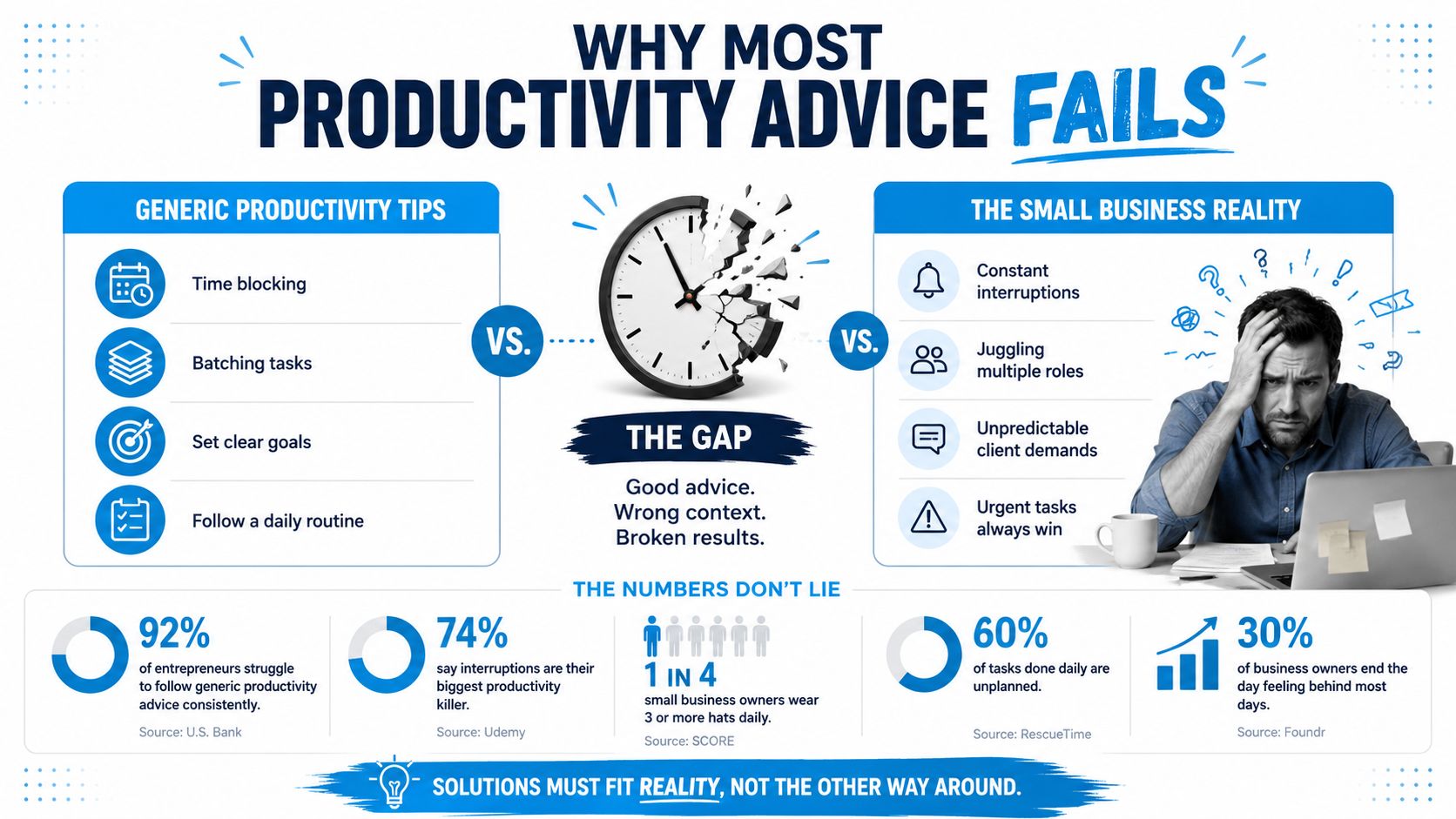
The hidden factory is where the time leaks live. In a service business, that usually means callbacks, clarification loops, duplicate data entry, missed handoffs, and interruptions that force people to restart. Generic advice points at habits. Real productivity improvement points at the work design that keeps creating the same delays.
Diagnose the Hidden Factory in Your Operations
Start with one common job and trace it end to end, from first contact to final handoff. In a dental clinic, that may be a new patient call, insurance check, intake, treatment, checkout, and follow-up. In an HVAC shop, it is the call, dispatch, estimate, parts check, job completion, invoice, and warranty follow-up. Draw every step, then mark every place where someone waits, asks for clarification, or does the same task twice.
Map the work before you fix it
Use a simple diagnostic before you touch a system. Time-use logs, a spreadsheet, call summaries, or a whiteboard all work if the team will keep them current. The goal is to show where time disappears, not to build a polished dashboard on day one. If a receptionist spends too long on the phone because the schedule is unclear, put that on the map. If a field tech waits for approval before ordering parts, put that there too.
A reference like workflow optimization is useful here because it forces you to examine the flow, not the symptom. A clinic may blame staffing when the problem is a broken intake sequence. A law firm may ask for more admin help when the core issue is that three people are entering the same client data in different places.
Track the job the way the customer experiences it, not the way your org chart wants to describe it.
Use the same lens across different businesses
A dental clinic often loses time at the front desk when intake forms, eligibility checks, and scheduling live in separate places. An HVAC company loses time when dispatch, technician notes, and billing do not line up. The same pattern shows up in service fleets, where you can reduce fleet vehicle downtime by treating waiting and coordination as operational losses instead of background noise.
For a service business, the baseline can stay simple:
- Count the handoffs: How many times does the job move from one person to another?
- Mark the waits: Where does work sit idle before the next action?
- List the rework: What gets corrected because the first pass was not clean?
That is enough to expose the hidden factory. Once you can see it, you stop guessing. The map also helps you choose fixes that matter, instead of burning energy on the loudest complaint of the week. For teams that want a closer look at process design, the internal workflow optimization resource fits neatly after this kind of mapping exercise.
Prioritize Improvements by Impact and Effort
Once the hidden factory is visible, don't try to fix everything. Rank the problems by impact and effort, then attack the few changes that move the day-to-day workload. A small team doesn't have the luxury of a long transformation roadmap. It needs the next best fix that produces relief quickly.
The fastest way to do this is a two-by-two matrix. Put the biggest time losses in the high-impact column and estimate how hard they are to change. In a pest-control business, for example, the owner may find that a handful of call types make up most of the missed revenue and callback chaos, while a long tail of special cases consumes attention without moving the business much. That's the key lesson from Pareto thinking. Not every problem deserves equal effort.

Choose the fixes that actually change the week
If scheduling errors are causing repeat calls, that's probably high impact and moderate effort. If a clinic's intake script is confusing patients, that may be high impact and relatively low effort. If you're thinking about hiring a new coordinator before cleaning up the work, you're moving too fast. Fix the system first.
The same logic applies in field service and in office work. An HVAC shop might improve more by standardizing dispatch notes than by adding another software subscription. A law firm might get more value from a cleaner intake checklist than from a new project management board. The decision rule is simple, if the change reduces the most common friction and can be deployed without a major reorganization, it goes near the top.
The Frontiers in Education review from 2025 found that planning, goal-setting, prioritization, and task organization were especially beneficial for productivity, and that goal-setting, prioritization, and short- and long-term planning consistently predicted higher performance (Frontiers in Education review). That lines up with practical operations work. Decide what matters first, then build around it.
For teams that want a structure for allocating scarce attention, the internal resource allocation optimization page is a useful companion. Use it after you've picked the top few fixes, not before.
Implement Changes Across People, Process, and Tools
Don't roll out a dozen changes at once. Assign the work across people, process, and tools, and give each lane a clear owner. That keeps the team from confusing “we bought software” with “we improved how work moves.”
Start with people and roles
Every staff member needs a short list of weekly priorities and one measurable deliverable. In a dental practice, the front desk might own insurance verification completion and same-day call-backs. In a law firm, an intake coordinator might own lead capture quality and document handoff speed. In a franchise or multi-location business, a location manager might own schedule adherence and issue escalation.
That sounds basic because it is. Productivity breaks down when nobody knows who owns the next step. Clear role definitions cut the “I thought someone else was on it” problem that drains time in small teams.
Standardize the process that causes the most repetition
For the highest-volume tasks, write a simple standard operating procedure. Keep it short enough that people will use it. A clinic may need a script for missed-call follow-up and new patient intake. An HVAC company may need a checklist for dispatch notes, photos, and invoice completion. A service firm may need one intake template that every coordinator uses the same way.
If the same mistake happens twice, document the process before you coach the person again.
Add tools only where they remove repeated manual work
Automation earns its keep in this context. AI receptionists, scheduling automation, and CRM integrations matter when they eliminate repetitive call handling, reminders, data entry, and handoff errors. Recepta.ai fits that category because it handles inbound and outbound calls, appointment scheduling, lead capture, follow-ups, and integration with calendars and CRMs, which makes it a tool for workflow cleanup rather than a shiny add-on.
The biggest mistake is using tools to decorate a broken process. A law firm can't fix a messy intake flow by adding one more app. A multi-location franchise can't solve inconsistent follow-up by letting every site choose its own system. Use technology after the team has agreed on the steps, ownership, and response rules. The internal third-party integrations resource is the right place to think about that layer once the process is defined.
Measure Outcomes with KPIs That Actually Fit a Small Team
Small teams should track three to five KPIs, not a boardroom dashboard full of vanity numbers. Pick metrics tied to revenue, customer experience, or rework, then review them on one page every week. If a metric doesn't change decisions, it's clutter.
Choose metrics that match the workflow
A clinic might track first-call resolution, average response time, and rework percentage. A pest-control company may care about qualified-lead conversion and repeat visit rate. A law office might watch lead-to-consult conversion and time to first response. The point is to measure the part of the process you just mapped, not whatever the software happens to display.
The Historical Fed benchmark and the EPI gap both point to the same lesson. Productivity matters because it shapes output and value creation, but it only improves when the system changes. That means your metrics should show whether the work got cleaner, faster, and less redundant. If the metric doesn't reflect that, it won't help you manage.
A useful companion here is the practical guide for 2026, especially if you need help thinking about performance measures without drifting into vanity tracking. Keep the lens tight. Measure what affects the customer and the backlog.
Build a light weekly review
Use one dashboard, one meeting, and one decision list. Review what changed, what got worse, and which root cause needs attention. Don't let the meeting turn into status theater. If a number moves, ask why. If it doesn't move, ask whether the team is looking at the right thing.
The internal performance monitoring systems page can support that discipline, but the rule stays the same. The dashboard should help the owner decide what to fix next, not impress visitors. If the weekly review doesn't result in an action, the dashboard is too big.
Protect Energy and Reduce Overload While You Improve
Productivity falls apart when people are overloaded, interrupted, or running on fumes. That's not a soft issue. It changes output. Harvard Business School reports that a meaningful increase in well-being yields, on average, about a 10% increase in productivity, and it also cites evidence that a one-standard-deviation increase in job satisfaction is associated with a 6.6% increase in hours worked (HBS). If you keep stacking friction on top of friction, the rest of your productivity plan gets swallowed.
The practical answer is to remove avoidable strain. Batch customer communication checks instead of forcing people to react all day. Protect short deep-work blocks for admins who need to complete billing, filings, or documentation without interruption. Kill recurring status meetings that exist only because no one trusts the process. The goal isn't to make the team feel nice. The goal is to stop draining attention from the work that pays the bills.
Productivity is a system problem. Workload, health, and operating model all show up in the numbers.
McKinsey's guidance, as summarized in the research brief, leans in the same direction. It emphasizes baseline employee health, pilot interventions, a small set of metrics, and root-cause fixes rather than symptom-chasing. That's the right instinct for a business owner who's already stretched. If you're asking people to move faster, first remove the stuff that keeps them restarting, switching tasks, and redoing work.
This is especially important in small service firms because interruptions don't stay small. One bad schedule can affect the front desk, the technician, and the next customer. One unclear note can create a second visit, a refund discussion, and a frustrated team member. Protecting energy is not separate from productivity improvement. It's part of the operating model.
Your 90-Day Iteration Plan and Final Checklist

The cleanest rollout is simple. Days 1 to 30, diagnose the hidden factory and map the highest-volume workflow. Days 31 to 60, implement the top two or three fixes across people, process, and tools. Days 61 to 90, measure the results, adjust the weak spots, and expand what worked.
Use this checklist every week:
- Weekly: Review one dashboard, one owner list, and one bottleneck.
- Monthly: Revisit the process map and update the highest-friction step.
- Quarterly: Remove one stale meeting, one redundant handoff, or one manual step that no longer earns its keep.
The main point is this. Productivity improvement is not a one-time project. It's a recurring operating rhythm. If you run it that way, you'll stop chasing apps and start fixing the core system that drains time.
If you want a tighter way to handle calls, scheduling, lead capture, and follow-up while your team focuses on the work that matters, visit Recepta.ai. It's built to fit the kind of service workflows that lose time in missed calls and messy handoffs. Use it as part of a broader process cleanup, not as a substitute for one.